
ICP Token Price Alerts
Get a Telegram message when an Internet Computer token reaches your target price, or rises or falls by a percentage you choose. Free, for every token on ICP Tokens, checked every minute.
Key facts
- Alert types
- Target price (rises above / falls below) or % change (rises by / falls by)
- % change
- Counted from the price when you create the alert; 0.1% to 1,000% up, up to 99% down
- Tokens
- Every token listed on ICP Tokens
- Currency
- USD or ICP, as selected at the top of the site
- Price checked
- Every minute, against the token’s price on ICP Tokens
- Notification
- A personal Telegram message from @icp_t0kens_bot, once per alert
- Manage
- In the bot: /alerts lists your active alerts, tap /delete to remove one, /stop removes all
- Cost
- Free, no account or sign-up
Two kinds of alerts
Target price
Choose Rises above or Falls below and enter a price. Example: CHAT rises above $0.10. The dialog shows how far your target is from the current price, and warns you if the price is already past it.
% change
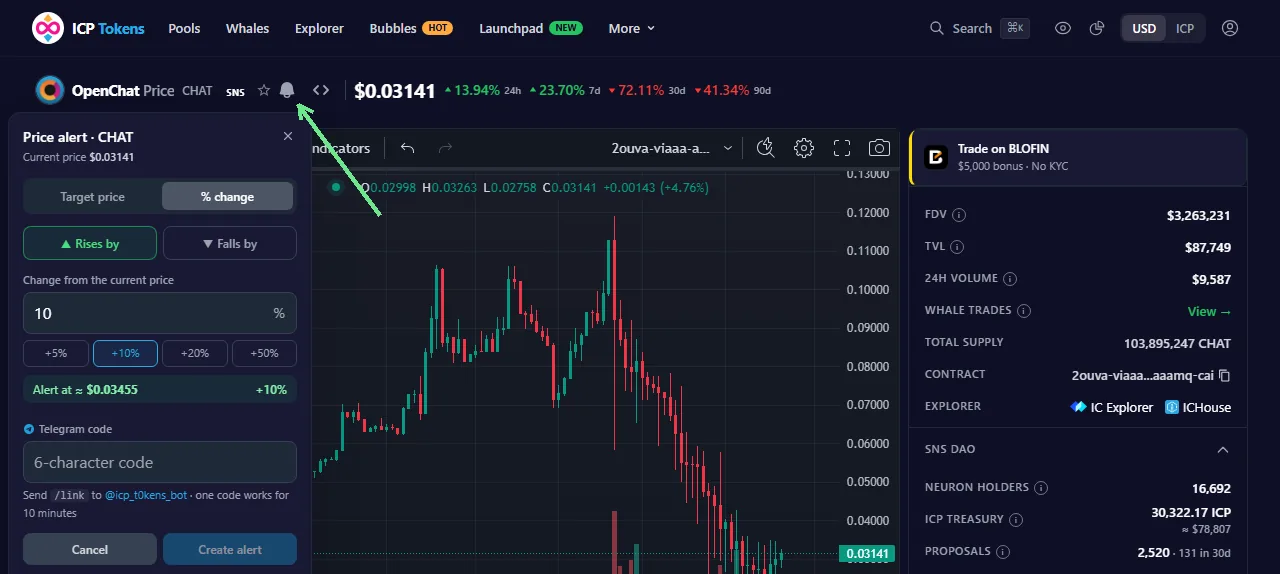
Choose Rises by or Falls by and type a percentage, or pick 5, 10, 20 or 50%. It is counted from the token’s price at the moment you create the alert and turned into a fixed target: +10% from $0.10 triggers at $0.11, −20% from $0.10 at $0.08.
How to set a price alert
1. Get a code from the Telegram bot
Open @icp_t0kens_bot in Telegram and send /start, then /link. The bot replies with a 6-character code. One code works for 10 minutes and for as many alerts as you like; send /link again for a new one. All commands are listed below.
2. Open the token and click the bell
On any token page (for example OpenChat (CHAT)), click the bell next to the token name.
3. Choose the alert and create it
Pick Target price or % change, the direction and the value, paste the code and click Create alert. Before you create it, the dialog shows the price the alert will trigger at; after, it confirms the exact target. On the same device the code is filled in for your next alerts for 9 minutes.
4. Get the Telegram message
Every minute the price on ICP Tokens is checked against all active alerts. When yours is reached, the bot sends you a personal message, once. To see or delete your alerts at any time, send /alerts to the bot.
Telegram bot commands
| Command | What it does |
|---|---|
/start | Starts the bot and shows the three steps |
/link | A 6-character code for creating alerts on icptokens.net, valid 10 minutes |
/alerts | Your active alerts, each with a delete command under it |
/delete | Removes one alert: tap the delete command under it in /alerts |
/stop | Deletes all your alerts and your chat from ICP Tokens, after you confirm |
/help | The list of commands |
The commands also appear in the bot’s menu when you type /. Every command acts only on the alerts of your own chat.
Price alerts FAQ
How do I get a Telegram alert when an ICP token rises 10%?
Is a % alert the same as the 24-hour change?
Which price are alerts checked against?
How often are alerts checked?
How do I see or delete my alerts?
/alerts to @icp_t0kens_bot. It lists your active alerts, each with its own delete command: tap it to remove that alert. /stop deletes all your alerts and your chat from ICP Tokens, after you confirm. The bot only shows and deletes the alerts of your own chat.What happens after an alert triggers?
Is it free? Do I need an account?
Can I set several alerts?
/link works for 10 minutes for all of them. You can create up to 5 alerts per minute.Can I change an alert?
/alerts and tap its delete command) and create a new one with the new level.The site says my code is invalid or expired
/link to the bot again and paste the new code. The code is 6 letters and digits; capital or small letters both work.Why didn't I get the message?
/start and create a new alert. A very short move between two checks can also be missed (see above).What data is stored?
/stop deletes all your alerts and with them your chat ID. More in the privacy policy.