
Documentation
How ICP Tokens Works
Last updated: October 2026
ICP Tokens is a real-time DeFi analytics platform for the Internet Computer ecosystem. We collect swap data exclusively from ICPSwap, the largest DEX on ICP, keep our own copy of the ICP ledger and of the listed token ledgers, and turn both into prices, charts, balances, transfers and portfolio analytics.
Only tokens with a trade in the last 30 days are listed. Trading data is updated every minute; ledger data (balances, transfers, ICP burn and mint) within seconds of each new block.

| Data Type | Update Frequency | Source |
|---|---|---|
| Swap collection | Every 1 minute | ICPSwap data API |
| Token metrics & prices | Every 1 minute | Aggregated from swaps |
| ICP/USD rate | Every 1 minute | Kraken (primary) |
| Pool discovery | Every 15 minutes | ICPSwap registry |
| TVL data | Every 30 minutes | Pool canister balances |
| Ledger transfers & balances | Within seconds of each block | Our copy of the ICP and token ledgers |
| Token holders & labels | Every 1 minute on the token page (the holder count in token lists and ICP's count every 5 minutes; labels and checks nightly) | Our copy of the ICP and token ledgers; ICExplorer / IC dashboard daily for tokens not yet proven exact |
| On-chain activity (active, new accounts, transfers) | Every 5 minutes for today; full history checked nightly | Our copy of the ICP and token ledgers |
| Network compute (cycles per second, on ICP Burn vs Mint) | Every hour | DFINITY's IC API (ic-api.internetcomputer.org) (their figure, not our measurement) |
| Token logos & metadata | Daily | ICRC-1 canister metadata |
- Data Collection
- Price Formula
- Your Data & Privacy
- Market Cap & FDMC
- Volume Calculation
- OHLCV Pipeline & Charts
- Data Quality & Filtering
- Real-Time Updates
- Portfolio Tracking
- Wallet Explorer
- Whale Alerts
- Smart Money
- Price Alerts
- TradingView Charts
- Bubbles Visualization
- API Access
- Security & Rate Limiting
- Token Decimals on ICP
- Token Listing & Delisting
- Known Limitations
- Disclaimer
- FAQ
1. Data Collection
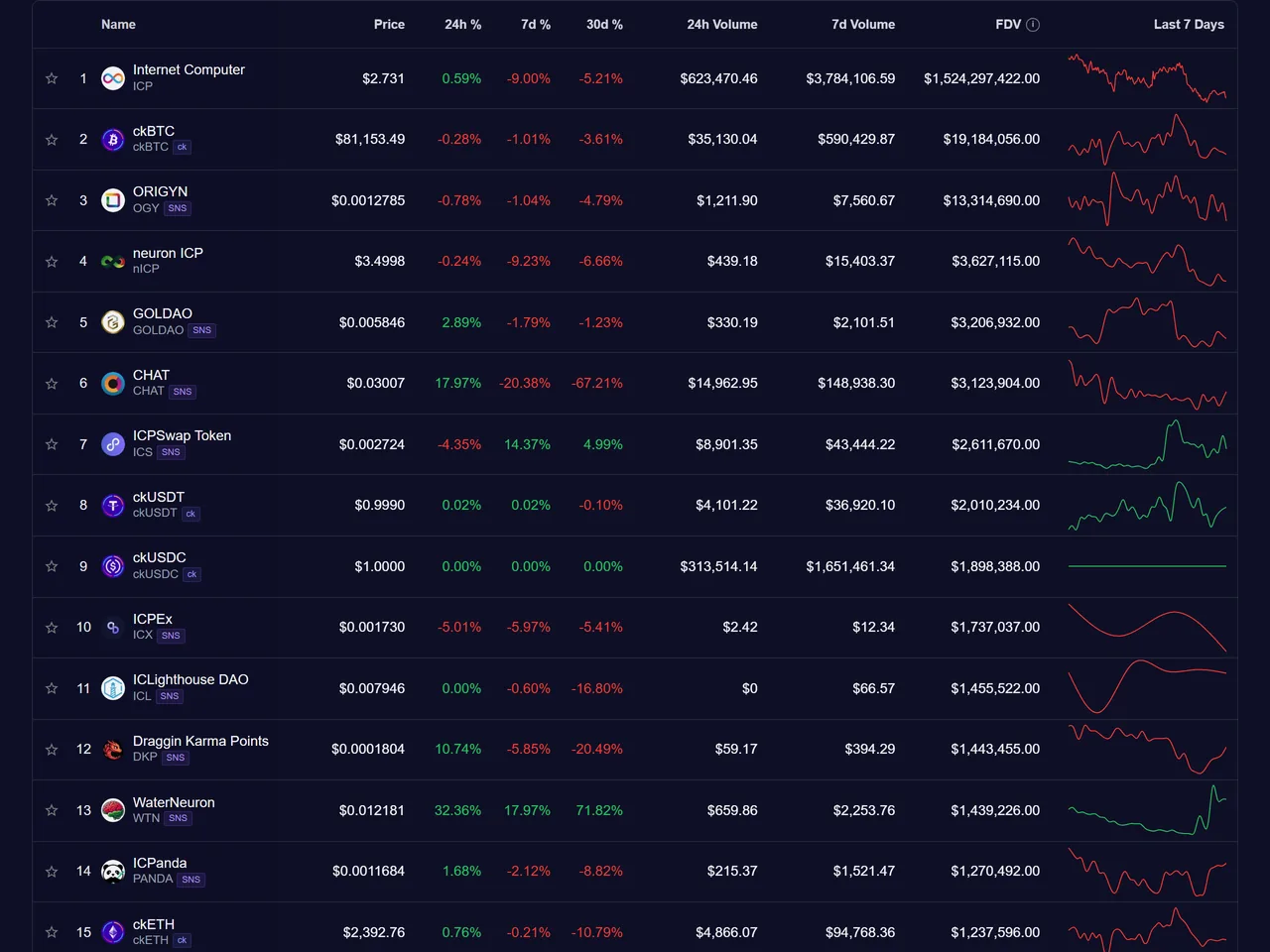
We collect swap data from ICPSwap every minute through ICPSwap's official data API, fetching every new transaction since the last one we recorded.
For each swap, we record: the pool, both token amounts, the on-chain price, the maker wallet address, and the exact timestamp. This data flows into our database where it is immediately available for analytics.
ICP/USD Conversion Rate
ICP-to-USD rates are fetched from Kraken (primary source, highest ICP liquidity) every minute, with automatic fallback to Binance and CoinGecko if Kraken is unavailable. Historical rates are stored for accurate retroactive price calculations.
2. Price Formula
Token prices come from ICPSwap trading data. We use the token0Price field that ICPSwap reports for each swap, which is the price of the token in the pool at the moment of the trade.
Prices never use ICPSwap's amountUSD field. The USD value of each trade (volume) is the value ICPSwap reports for that swap; we check it against amount x token0Price, and on every pool with real volume the two match (checked October 2026 over 7 days).
Best Pool Selection
Many tokens have multiple liquidity pools on ICPSwap (e.g., CHAT/ICP and CHAT/ckUSDT). The platform automatically selects the best pool for each token — the pool paired with ICP or a stablecoin that has traded in the last 24 hours and holds the most liquidity (TVL). This pool is used for price display on the homepage, token rankings, and real-time WebSocket updates. The token detail page chart always shows data from the best pool.
Pool Liquidity (TVL)
Every 30 minutes we read how many tokens each ICPSwap pool canister holds and value them at current prices. This includes uncollected trading fees and tokens that users deposited into the pool but have not yet added as liquidity or withdrawn, so it can be higher than ICPSwap's figure, which counts only active liquidity. A token without a price of its own on our site is valued at the pool's own rate from its last trade in the past 7 days. A reading more than 10 times the previous one is accepted only when the next reading, 30 minutes later, confirms it. If a pool's balances cannot be read for 3 days, its TVL is shown as unconfirmed and is not counted. Pools that ICPSwap no longer lists and that have not traded for 7 days are not tracked.
Project Links
The links to a project's own website, app and whitepaper on a token page are checked every day. A link that fails two daily checks in a row (the domain no longer exists, the server does not answer, or the page is not found) is hidden until it works again. Links to social networks are not checked automatically.
Pool Page Prices
A pool page shows the price of one token of the pair. When one side is ICP, ckUSDT, ckUSDC, ckBTC or ckETH, it is the price of the token paired with it (for a pair of two of them, the first token). If one side of a pool holds less than 2% of the pool's value, the page says that its price can differ from the market price.
Token Detail Page Prices
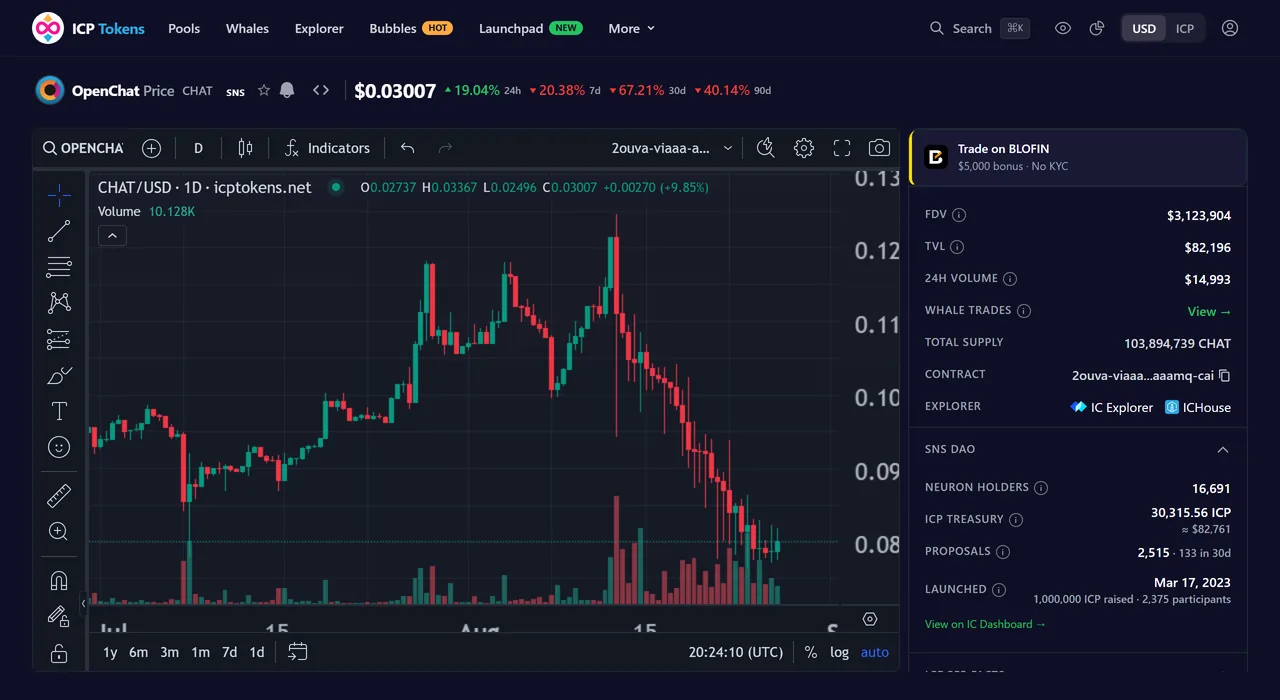
On each token detail page, the displayed price, 24h change, volume, and FDMC come from the aggregated token metrics cache (updated every minute). The TradingView chart shows OHLCV candles from the best pool. You can switch between USD and ICP display using the currency toggle in the header. All pools for a token are listed on the token pools tab.
Percentage Changes
Price change percentages are calculated from OHLCV candle data, not from spot price comparisons. 24-hour changes use 1-minute candles, while 7-day, 30-day, and 90-day changes use 1-hour candles for efficiency and accuracy.
3. Market Cap & FDMC
Fully Diluted Market Cap (FDMC) is the primary market cap metric displayed on the platform. It is calculated as:
FDMC represents the theoretical market capitalization if all tokens were in circulation at the current price. We use FDMC rather than circulating market cap because reliable circulating supply data is not consistently available for all ICP tokens. When total supply data is unavailable, the FDMC field shows "--".
4. Volume Calculation
The 24h Volume displayed for each token is the sum of all swap USD values involving that token over the last 24 hours. Each swap is counted once — from the perspective of the token being viewed. Volume is aggregated across all ICPSwap pools where the token is traded.
Volume data reflects only ICPSwap activity. Trades on other DEXes or off-chain exchanges are not included.
5. OHLCV Pipeline & Charts
Every minute, our aggregation pipeline processes new swaps into 1-minute OHLCV candles (Open, High, Low, Close, Volume). These base candles are stored in a time-series database built for financial data.
From the 1-minute base, the database automatically builds 14 higher timeframes: 3m, 5m, 15m, 30m, 1h, 2h, 4h, 6h, 8h, 12h, 1d, 3d, 1w, and 1 month. This gives our TradingView charts full multi-timeframe support with both USD and ICP denominated values.
6. Data Quality & Filtering
Raw DEX data can contain outliers from dust trades, arbitrage bots, and low-liquidity spikes. We apply several filters to ensure displayed prices reflect genuine market conditions:
- Outlier Filter: Each swap price is compared against a 30-day recent median. Prices below 2% or above 50x the median are excluded from candle generation.
- Phantom Gainer Shield: Tokens with extreme percentage changes (over 1,000%) but negligible 24h volume (under $5,000) are suppressed to prevent misleading rankings.
- ICPSwap Cross-Check: Every hour each listed token's price is compared with ICPSwap's own price for the same pool. Both come from the pool's on-chain price, so they should be equal; a gap above 5% in two hourly checks in a row raises an alert so the data can be fixed. A gap is not counted when ICPSwap's figure is the price of an earlier trade we already have (ICPSwap's pool data can lag behind its newest trades).
- Zero-Price Guard: Swaps with price_usd = 0 are excluded from the OHLCV pipeline entirely.
- Data Quality Monitor: An automated check runs every 30 minutes, verifying ICP price accuracy against Kraken (within 5%), stablecoin price stability (ckUSDT between $0.95-$1.05), and top token prices against the last on-chain swap (within 10%, reported when two checks in a row disagree, so a few minutes of fast trading do not raise a false alarm).
7. Real-Time Updates
When you open the homepage, a token detail page, or a pool detail page, prices and new swaps appear instantly without any page refresh. When something is wrong, a dot appears in the header: yellow when live updates are paused or data is delayed, red when the database is unavailable and cached data is shown. Token lists also reload from the API every 60 seconds, so data keeps updating even without the live connection.
Architecture
"Real-time" describes our delivery layer, not the data source. ICP canisters do not natively push events to off-chain consumers — there is no equivalent of Ethereum's eth_subscribe or Solana's accountSubscribe. Polling at the source is currently the only way to read ICPSwap data.
The pipeline:
- ICPSwap's data API is polled once per minute by our backend collector.
- Backend collector reads new swaps and passes them to the backend.
- Backend writes each swap to the database and broadcasts a swap event.
- WebSocket server fans out the event to all connected clients instantly.
ICPSwap data API
      │  polled once per minute
      ↓
Backend collector
      │
      ↓
Backend writes to DB → broadcasts new swap event
      │
      ↓
Our WebSocket server
      │  instant fan-out
      ↓
All connected clients
Cost & scalability
This design is intentionally cheap and scales to many users at near-zero marginal cost:
- One collector polls ICPSwap once a minute, re-reading the last 30 minutes so late-published trades are not missed, plus wider sweeps every 30 minutes, daily and weekly — a few hundred requests per hour, depending on how much is traded, and the same whether we have 1 user or 10,000.
- Each new swap is broadcast once and reaches all subscribed clients via fan-out. The marginal cost per additional user is essentially zero.
Latency & limits
Typical delay: about 2 minutes. We ask ICPSwap for new trades every minute, and ICPSwap publishes each trade a little after it happens. Measured over 24 hours on October 23, 2026 (16,447 trades): half reached our data within 1¾ minutes of the trade, 9 in 10 within 2½ minutes, 99 in 100 within about 3¼ minutes. Once the collector sees a trade, it is sent to your browser right away.
This is not sub-second real-time like a centralized exchange order book. Centralized exchanges run engines that push events at the source. Until ICP adds canister-level push events for off-chain consumers, polling at the source is unavoidable. What this design does guarantee:
- Updates arrive at all connected clients simultaneously the moment the collector sees them.
- No per-user polling overhead — your browser does not hit our API every few seconds.
- No surprise IC cycle costs as the platform scales.
Common question: "Isn't real-time WebSocket expensive?"
Opposite — WebSocket is the cheap part. The unavoidable cost is polling the source (a few hundred requests per hour, the same for any number of users). The WebSocket fan-out adds essentially nothing on top — one broadcast event reaches all connected clients regardless of whether there are 10 or 10,000.
8. Your Data & Privacy
ICP Tokens uses Internet Identity — the Internet Computer's native decentralized authentication — for all personalized features. No passwords, no emails, no personal information is collected.
When you log in with Internet Identity, the following data is stored on an ICP canister (on-chain smart contract) under your unique principal. We do not have access to this data — only your Internet Identity can read or modify it:
| Feature | Logged In | Not Logged In |
|---|---|---|
| Manual Portfolio | Stored on ICP canister | Not available |
| Watchlist / Favorites | Stored on ICP canister | Not available |
| Chart Drawings | Stored on ICP canister | Browser localStorage |
| DEX Trades wallet link | Stored on our server | Not available |
Canister-stored data (portfolio, watchlist, chart drawings) is fully decentralized. It persists across devices and browsers as long as you log in with the same Internet Identity. We cannot read, modify, or delete it.
Chart drawings are saved automatically when you draw on a chart. If you are not logged in, drawings are stored in your browser's localStorage (lost if you clear browser data). When logged in, they are saved to the ICP canister and available everywhere.
DEX Trades wallet link is the only piece of personalized data stored on our server — it maps your Internet Identity principal to a wallet address you choose to link. This is needed because your II principal is different from your ICPSwap trading wallet. You can unlink at any time.
9. Portfolio Tracking
ICP Tokens offers three portfolio modes at /portfolio: Track Wallets works without logging in; Manual Portfolio and DEX Trades use Internet Identity:
Track Wallets
Add any principal or ICP account ID — no login, nothing to connect; the list is saved only in your browser. Balances are the real ones, from our own copy of the ICP and token ledgers (the same as the Explorer), so tokens received by transfer are included and nothing can be negative. The chart shows the value of the holdings for every day: the balances at the end of that UTC day × that day’s close of each token’s chart (ICP: the Kraken daily close, from April 5, 2024), today at live prices; it is the value of what was held, including tokens moved in or out, not a profit. For a principal, ICP is its default account; tokens listed on ICP Tokens only; ICP staked in neurons and pool liquidity are not included yet. With several wallets, the totals, chart and holdings show all of them together; the buttons above (or “Show only” next to a wallet) show one wallet on its own.
Manual Portfolio
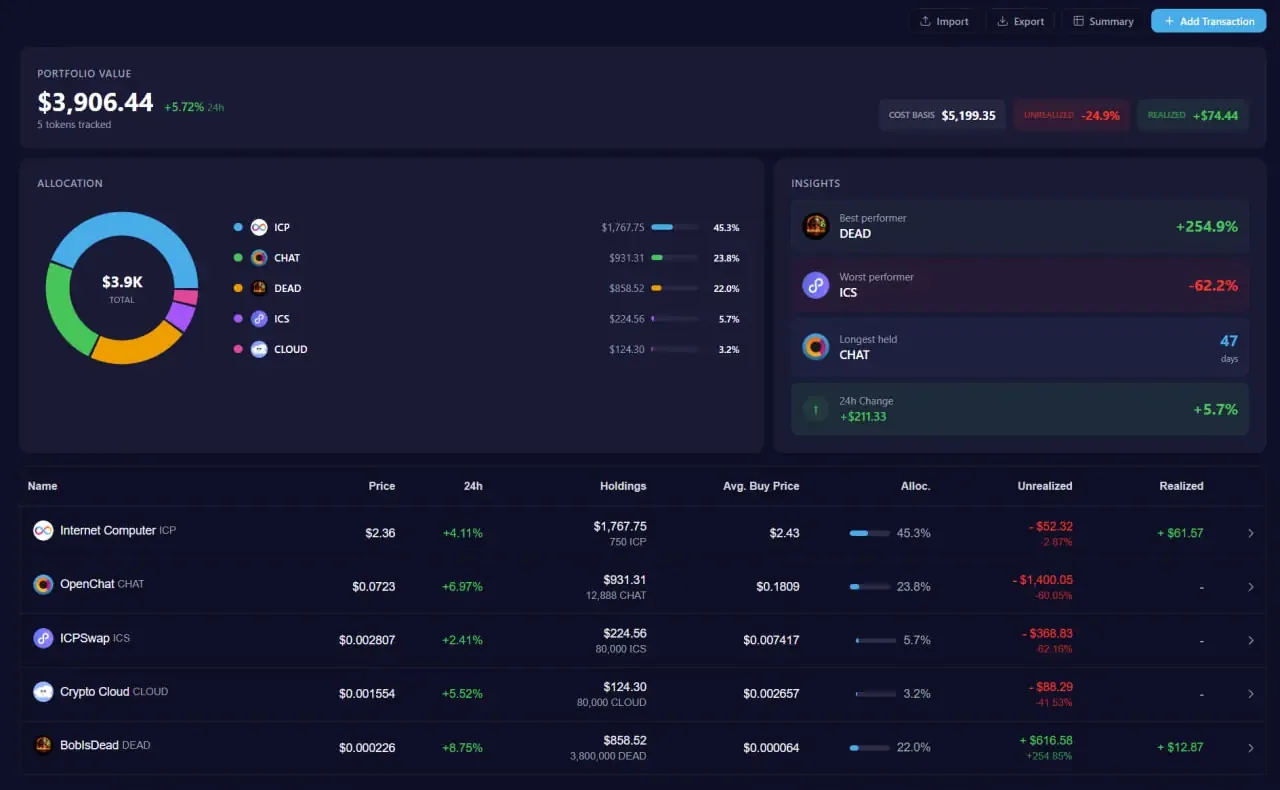
Add buy and sell transactions manually. The platform calculates weighted average cost basis, realized and unrealized P&L, holding periods, and portfolio allocation. Supports CSV import/export for backup and migration. Historical prices are automatically fetched for the exact date and time of each transaction.
DEX Trades
Link your ICP wallet address to see every ICPSwap swap that wallet has made: date, token pair, amounts and USD value at the time of the trade. The list can be exported to CSV. It shows trades only; it does not calculate holdings or P&L.
Portfolio Calculations
The Manual Portfolio uses these formulas:
The average buy price is that of the position held at the moment of each sell (weighted average cost). A sell larger than your recorded holdings — tokens you received by transfer or airdrop — has no recorded cost: that part is left out of realized P&L and the token is marked “sold … more than recorded”. The 24h change counts price moves only, not money added by buying.
In DEX Trades, the value of each swap is its USD value at the time of the trade, which matches amount x token0Price.
Note: DEX Trades reflects only ICPSwap trading activity. Tokens received via transfers, airdrops, or other DEXes are not included. For the real balances of a wallet and their value over time, use Track Wallets.
10. Wallet Explorer
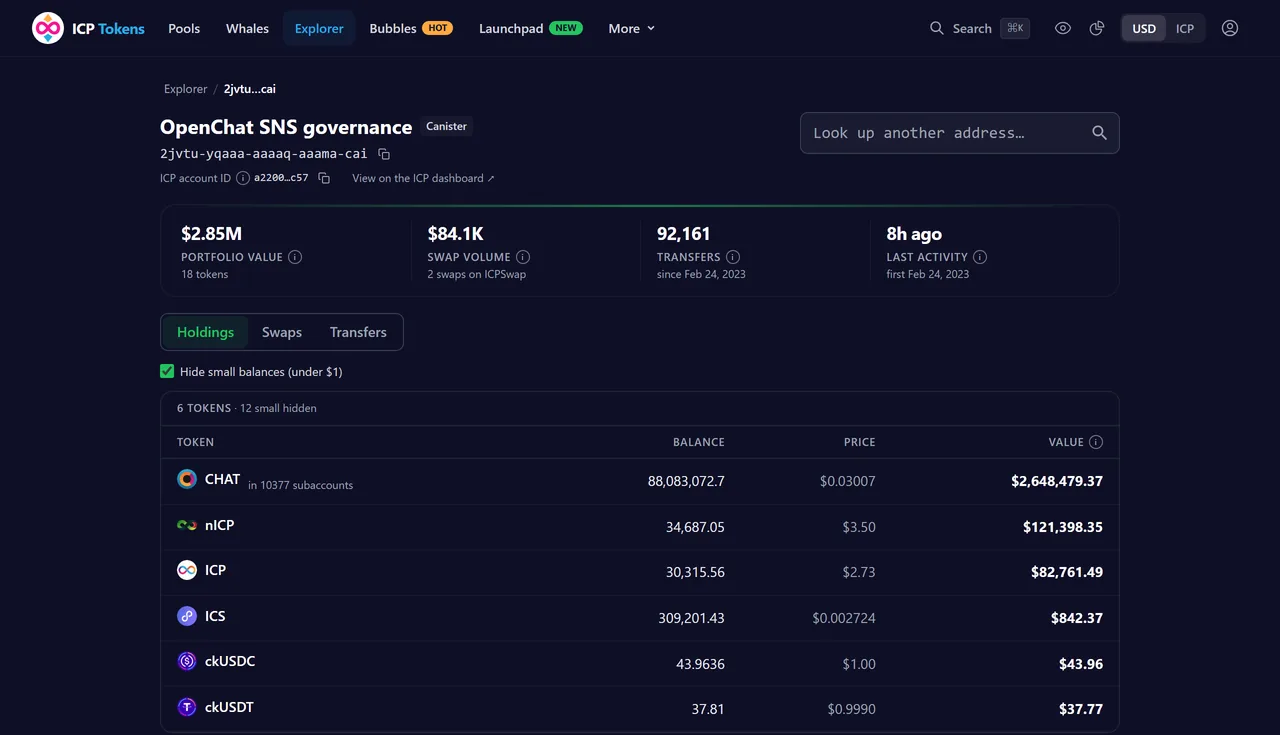
The Explorer shows any principal, canister or ICP account ID: its real Holdings (balances of ICP and of the listed tokens, read from our own copy of the ledgers, at today's price), its ICPSwap Swaps (what it sold and got, and the value at the time) and every Transfer in and out, mint, burn and approval (valued at the time, with a link to the block on the ICP dashboard).
Every list is filtered on the server over the whole history — by token, buy or sell, in or out, type, period, minimum value (for transfers: periods up to 90 days) or the other address — and the filters stay in the page address, so a view can be shared. For a principal, ICP is shown for its default account: ICP in its other subaccounts cannot be linked to it from the ledger. Labels come only from primary sources and are the same as in the token holders lists (DEX pools, SNS DAO treasuries, staked neurons and canisters, minting accounts, protocol canisters); exchange accounts are not labeled.
11. Whale Alerts
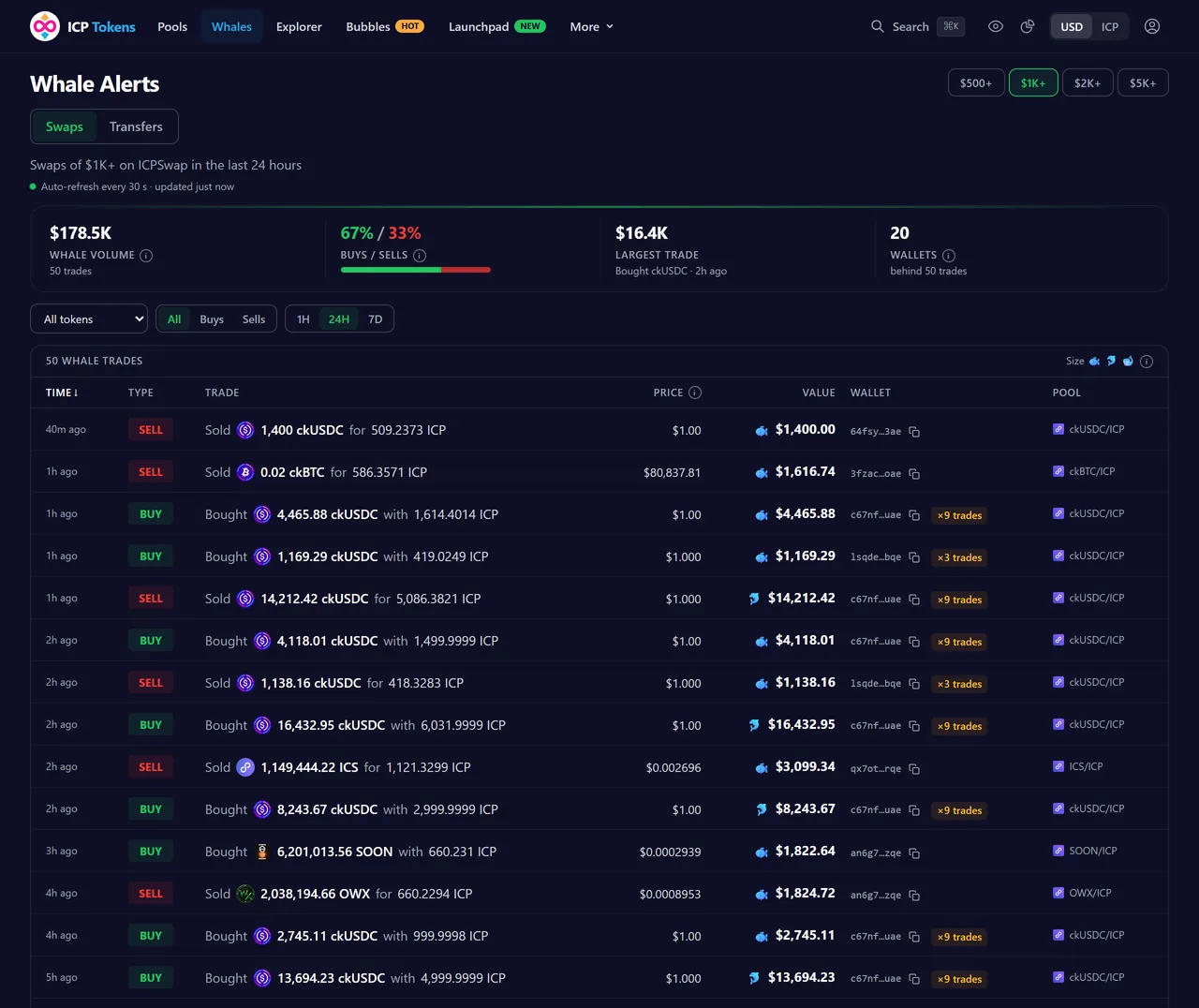
The Whale Alerts page has two tabs. Swaps lists large ICPSwap trades — minimum $500, $1,000, $2,000 or $5,000, the last hour, 24 hours or 7 days. Transfers lists large on-chain transfers of ICP and of the listed tokens from our own copy of their ledgers — minimum $1,000, $5,000, $10,000 or $50,000, valued at the time of each transfer. Both refresh every 30 seconds.
Each trade shows whether it was a buy or a sell, the token, the amounts, the USD value and the wallet; each transfer shows the amount, the value, both sides and the block. Click an address to open it in the Explorer, or copy it with the icon next to it.
12. Smart Money
The Smart Money page ranks wallets by realized profit from trading tokens on ICPSwap over 7, 30 or 90 days. Every swap of a wallet counts as selling one token and buying the other at the swap's value in US dollars; each token is tracked at its average cost over the wallet's whole swap history, and profit is what a sale brought in above that cost. Only sales inside the period count.
ICP and USD stablecoins (ckUSDC, ckUSDT, icUSD, VCHF) count as cash: their own gain or loss is shown separately, so the ranking measures token trades rather than the ICP price. Tokens sold without a purchase we can see (received by transfer, bought elsewhere) count as bought at the sale price and add no profit. Left out: canisters (pools, routers, aggregators), accounts labeled from primary sources (DEX pools, DAO treasuries, protocol and minting accounts), high-frequency bots (more than 100 swaps per active day, or a median gap under a minute over at least 10 active days) and wallets with fewer than 3 trades or under $500 sold in the period. A sale more than 20% away from the pool's median price in the hour around it adds no profit. The ranking is rebuilt once a day from all ICPSwap swaps in our database; trades on other exchanges are not included.
13. Price Alerts
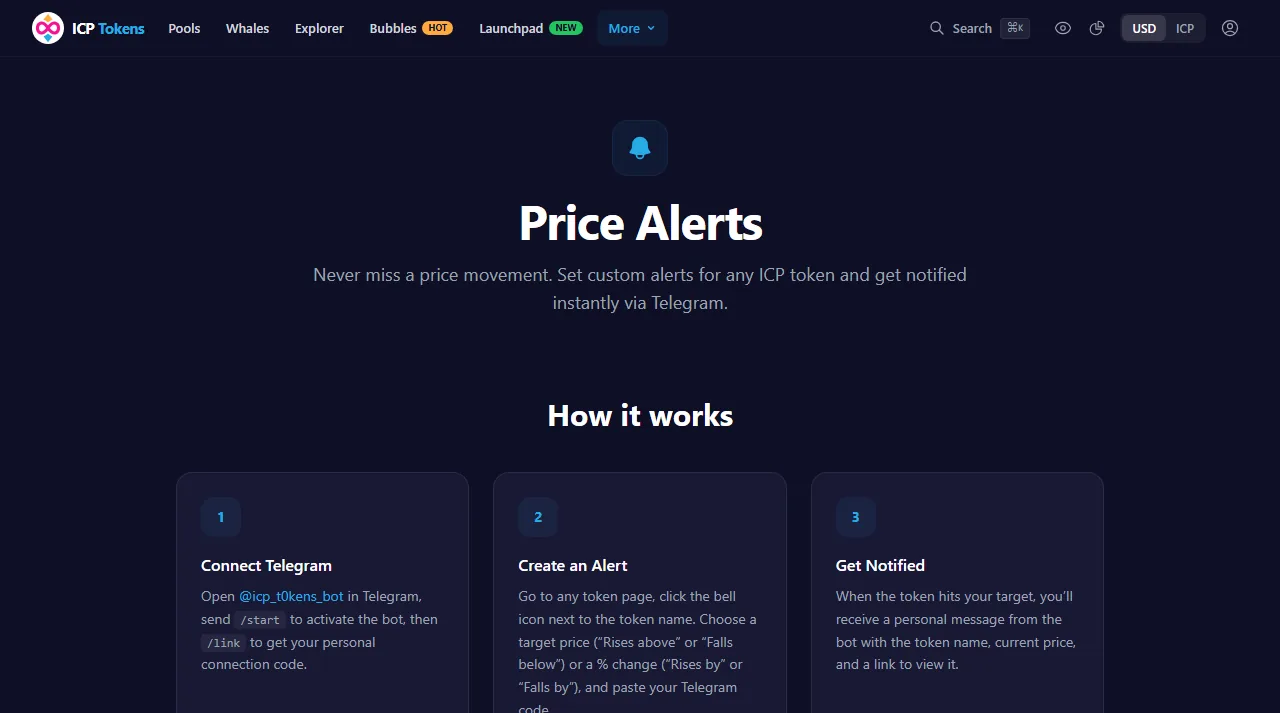
Set custom price alerts for any token with the bell icon next to the token name on its page (the Alerts page explains how). Choose a target price ("rises above" or "falls below") or a % change ("rises by" or "falls by"), in USD or ICP. A % change is counted from the token’s price at the moment you create the alert and turned into a fixed target (+10% from $0.10 = $0.11). All active alerts are checked every minute; when the condition is met, the Telegram bot sends you a personal message.
To get started: open @icp_t0kens_bot in Telegram, send /start to activate the bot, then /link to get a connection code, paste it in the alert dialog on a token page, and create your first alert. Each alert triggers once — when the price crosses your target. In the bot, /alerts lists your active alerts with a delete command for each, and /stop deletes all of them.
14. TradingView Charts
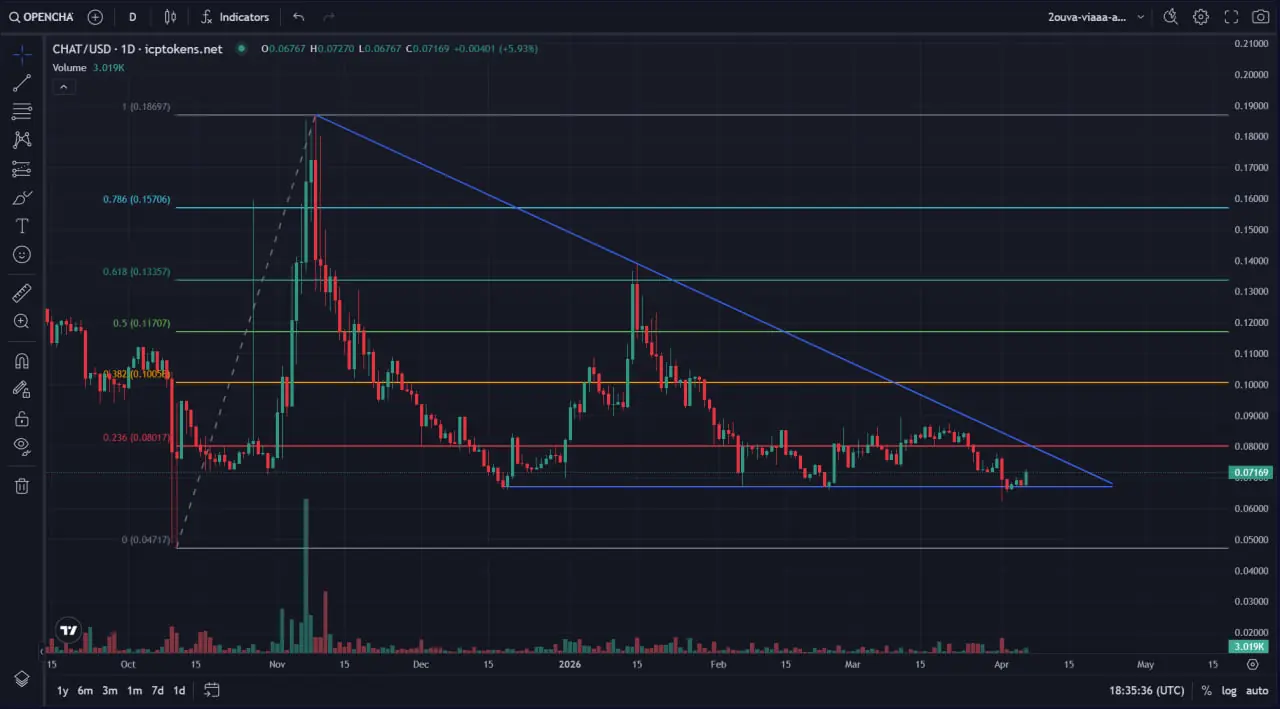
Every token has a full-featured chart powered by TradingView technology. Fifteen timeframes are available, from 1 minute to 1 month (1m, 3m, 5m, 15m, 30m, 1h, 2h, 4h, 6h, 8h, 12h, 1d, 3d, 1w, 1M). Charts support standard tools: crosshair, trend lines, Fibonacci retracements, and more. Drawings are persisted across sessions.
15. Bubbles Visualization
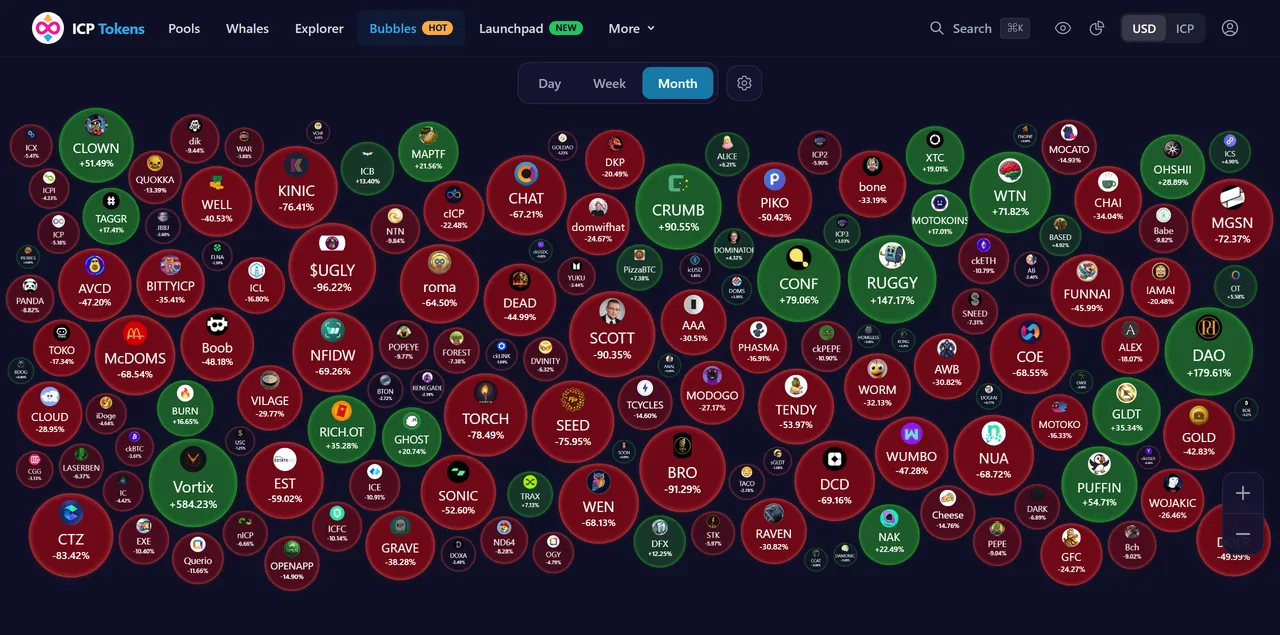
The Bubbles page shows all tokens as interactive, physics-simulated bubbles. Bubble size represents the magnitude of price change, while color indicates direction (green for gains, red for losses). Supports pinch-to-zoom on mobile, click to navigate to token details, and period selection (24h, 7d, 30d).
16. API Access
All data on ICP Tokens is available through a public REST API. The API serves token prices, OHLCV candles, pool data, swap history, whale alerts, and more.
| Tier | Rate Limit | Price |
|---|---|---|
| Free | 30 requests/min per IP | $0 |
No API key is required. The API is free for everyone; there is no paid plan. Full documentation is available at /api-docs. If your project needs a higher limit, write to contact@icptokens.net.
17. Security & Rate Limiting
- HTTPS: All connections are encrypted via TLS. HTTP requests are redirected to HTTPS.
- Content Security Policy: CSP headers limit which sites scripts, frames and connections may come from.
- CORS: API access is restricted to authorized origins. Wildcard origins are not permitted.
- Rate Limiting: API requests are limited per IP address (30 requests per minute).
- Authentication: Portfolio features use Internet Identity (ICP's native decentralized authentication). No passwords are stored.
18. Token Decimals on ICP
Tokens on the Internet Computer follow the ICRC-1 standard, which allows each token to define its own decimal precision. There is no universal standard:
| Token | Decimals | 1 Token = |
|---|---|---|
| ICP | 8 | 100,000,000 e8s |
| ckBTC | 8 | 100,000,000 satoshis |
| ckETH | 18 | 10^18 wei |
| ckUSDC | 6 | 1,000,000 |
| SNS tokens | 8 | 100,000,000 (typical) |
ICPSwap's data API already handles decimal conversion. The swap data we receive is already in human-readable format (e.g., 1.5 ICP, not 150,000,000 e8s). On-chain data from ICRC-1 ledger canisters (balances, transfers) comes as raw integers and is divided by 10^decimals on our backend.
19. Token Listing & Delisting
Tokens are listed automatically. Once a day we check every token against three criteria: an ICPSwap pool paired with ICP that holds at least $1,000 in liquidity (TVL), at least one swap in the last 24 hours, and at least $50 in trading volume over the last 7 days. These thresholds filter out launch-day rugs and dust-trade spam. There is no application process and no listing fee.
Tokens are hidden from the main listings when they have had no trades for 30 days. We also remove older contracts after a project migrates to a new one, duplicates of a token that is already listed, and tokens whose liquidity is gone. Historical data for delisted tokens remains accessible via the API.
Token names and descriptions
A token's ledger often reports only its symbol as its name. We show the name the project is known by, taken from official sources: the project's SNS DAO record for SNS tokens, ICPSwap's token list and the project's own website. Descriptions are written from the same sources. When a token has no description or no links, we also read what its creators published on-chain: the ledger's own metadata, the token's market on the Soon launchpad, for SNS tokens the DAO's record and, when none of these has anything, the description and links the project submitted to ICPSwap's on-chain token list. This is checked every day, a person reviews every proposed description and link before it appears, and it only fills empty fields. If something about your token is wrong or missing, contact us on Telegram.
To request a token listing, ensure the token has an active ICPSwap pool with liquidity. If the token has recent swaps but does not appear, please contact us on Telegram.
20. Known Limitations
- ICPSwap only: Currently, swap data is collected exclusively from ICPSwap. Trades on other ICP DEXes are not reflected in our analytics.
- DEX Trades vs. actual balance: DEX Trades lists swaps only. It does not show tokens received via direct transfers, airdrops or staking rewards, or tokens sent to other wallets.
- Historical data: Swap collection began in January 2023. Trades before this date are not available.
- Price accuracy: Prices reflect ICPSwap trading data and may differ from other platforms that use different data sources or aggregation methods.
21. Disclaimer
ICP Tokens is an analytics and information platform only. We are not an exchange, broker, or financial advisor. We do not hold, custody, or have access to any user funds or tokens.
The data provided is for informational and educational purposes only and should not be considered financial, investment, or trading advice. Always do your own research (DYOR) and consult a qualified financial advisor before making investment decisions.
While we strive for accuracy, we make no guarantees regarding the completeness, accuracy, or timeliness of any data. Prices and analytics may be delayed, inaccurate, or differ from other sources. Use at your own risk.
See our full Disclaimer and Terms of Service.
22. Frequently Asked Questions
Where do token prices come from?
How are holders counted and labeled?
What is the on-chain activity on a token page?
How often is data updated?
Why is the price different from CoinGecko or CoinMarketCap?
What is FDMC?
How do I buy an ICP token?
What is a canister ID, and where do I find a token’s contract address?
What are ckBTC, ckETH and ckUSDC?
What does the SNS badge on a token mean?
Why was a token removed from the list?
Why does my portfolio show a different balance than my wallet?
Can I use the API for my trading bot?
Is ICP Tokens free?
Do you hold my funds or tokens?
How do I list my token on ICP Tokens?
How do I update my token’s information?
What are the “Ledger facts” on a token page?
What happens if ICPSwap goes down?
Do you support other DEXes besides ICPSwap?
Questions? Reach out on Telegram.
Back to top